
Process Runner.
Run PowerShell directly from Easit GO – event-driven, scheduled and traceable
Many repetitive tasks in an IT organization's everyday life require a system action as a consequence of something happening in the case system. A user requests access - an account must be created. An incident is escalated - a service must be restarted. An onboarding case is opened - a script must be run. With Process Runner, the system action takes place automatically, directly from Easit GO, without a technician needing to change tools or manually trigger a script. The PowerShellskills you already have in the organization become part of the process flow.
What is Process Runner?
The bridge between Easit GO and Microsoft PowerShell
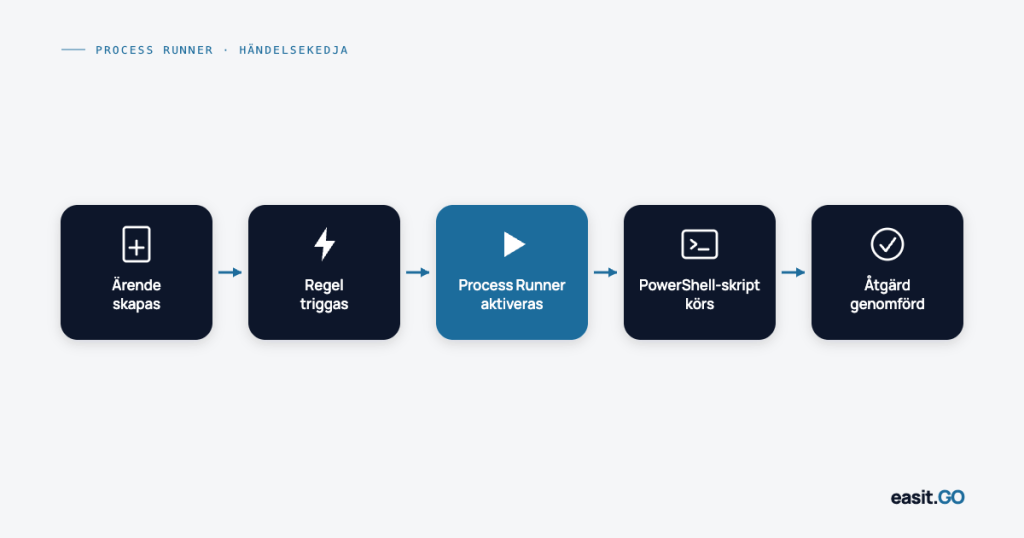
Process Runner is an add-on to Easit GO that allows you to execute PowerShell scripts directly from the platform, triggered by events, rules or scheduled times, without leaving the GO interface.
This means that system actions that previously required manual intervention or external schedulers can be integrated directly into the case flow. The script is run, the results are logged, and the process continues automatically and traceably.
Process Runner is triggered in three ways:
- Event-driven – a case is created, a status changes, a field is updated → script runs automatically
- Rule-based – business rules in GO identify a condition → Process Runner executes the action
- Scheduled – recurring jobs run at defined times without manual initiation
Process Runner is an add-on and requires a separate license in addition to the Easit GO base subscription.
Why it matters.
System actions should not be manual steps in a process
Every time a technician manually triggers a script as a result of something that happened in the case system, it is a process problem – not a technology problem. The information about what to do is already in GO. The delay is due to the lack of connection to the system action.
Process Runner eliminates that loophole.
It produces concrete effects:
Shorter response times – the system action is triggered immediately when the condition is met, not when a technician has time to do it
Free up engineering time – routine tasks like password resets, account provisioning, and service restarts are handled automatically, freeing up time for more complex issues
Fewer human errors – a script that runs consistently always does the same thing, regardless of load, time of day, or operator experience level
Full traceability – every run is logged in Easit GO, linked to the case or event that triggered it
Scalability without new recruitment – increasing case volumes are handled without linearly increasing staffing
What Process Runner is used for.
Typical use cases
Process Runner is a general automation tool and what is automated is controlled by the PowerShell scripts your organization already has or is building. Here are some common scenarios.
Identity and Access Management
Create, modify and deactivate user accounts in Active Directory directly from Easit GO. When an onboarding case is approved, the account is created. When an offboarding case is closed, it is deactivated. No manual step, no delay, no lag between the case system and the directory service.
Password Reset and Self-Service Support
Automate password resets triggered from the service desk or via the self-service portal. The script runs, the confirmation is sent back to the case – without the need for a technician to be involved in the routine execution.
Service monitoring and automatic restart
Link monitoring alarms to Process Runner. When an alarm reaches GO and meets defined conditions, Process Runner can automatically attempt to restart a service, clear a queue, or run diagnostics – and log the results directly to the incident case.
Software distribution and patch management
Trigger installations and updates as part of a case flow. An approved change case triggers the right script to be deployed to the right machines – controlled, documented and traceable directly in GO.
Scheduled maintenance jobs
Run recurring maintenance tasks – temporary file cleanups, export jobs, synchronization routines – at scheduled times without external schedulers. The runs are logged in GO and deviations can trigger cases automatically.
Onboarding and offboarding
Coordinate the entire account provisioning flow as part of HR-initiated processes in Easit GO. From approving an onboarding case to having accounts, permissions, and equipment orders in place – with PowerShell scripts performing the system actions and GO holding the flow together.
Technical requirements.
What you need to get started
Process Runner requires:
- Easit GO with valid base platform license
- Process Runner license (add-on)
- Microsoft PowerShell installed in your environment
- Existing or newly developed PowerShell scripts for the processes you want to automate
Configuration of triggers, rules, and scheduled runs is done in Design Studio. Script management is done in the PowerShell environment. Technical expertise is required – Process Runner is a tool for system administrators and IT professionals, not a no-code option.
If you need help getting started, Easit's consultants can support both configuration and script development.
Part of GO's automation engine.
Process Runner in a larger context
Process Runner is one of three parts of Easit GO's automation engine:
Workflow – build visual workflows without coding, triggered by events and conditions
Business rules – define rules that automatically assign, escalate, notify, or close cases
Process Runner – execute PowerShell scripts for system operations that require interaction with external environments
Together, the three parts provide a complete automation platform that handles everything from simple escalations to complex, multi-step processes with actual system actions as a consequence.
Ready to connect system actions directly to your processes?
Show us your flows, we'll show you how Process Runner can eliminate the manual steps.
Book a demo or contact us and we'll tell you more.
Process Runner FAQ.
What is Easit Process Runner?
Process Runner is an add-on to Easit GO that allows you to run Microsoft PowerShell scripts directly from the platform. The scripts are triggered by events, business rules or scheduled times – without a technician having to manually initiate the execution.
Is programming knowledge required to use Process Runner?
Yes, some technical expertise is required. Process Runner is designed for system administrators and IT professionals who work with PowerShell. Configuring triggers and rules in Design Studio requires technical understanding, and the underlying scripts are written in PowerShell.
Is Process Runner included in the basic Easit GO subscription?
No. Process Runner is an add-on and requires a separate license in addition to the basic Easit GO subscription.
How are runs triggered in Process Runner?
Runs can be triggered in three ways: event-driven (something happens in a case or object in GO), rule-based (a business rule identifies a condition), or scheduled (recurring jobs at defined times).
Are the runs logged in Easit GO?
Yes. Each run is logged in Easit GO, linked to the case or event that triggered it. This provides full traceability and the ability to follow up on deviations directly in the platform.
How does Process Runner relate to GO Connect?
GO Connect handles data communication and integration with external systems via API and JSON messages. Process Runner executes PowerShell scripts that perform system actions in your environment. They can be used in parallel and complement each other in complex automation flows.
Can Process Runner be used for scheduled jobs without a case triggering it?
Yes. Process Runner supports timed runs that run at scheduled intervals – independent of case events. This makes it possible to use GO as a platform for recurring maintenance jobs and export routines.
What support is available to get started with Process Runner?
Easit consultants can support both configuration in Design Studio and script development in PowerShell. In addition, technical documentation is available at docs.easitgo.com.

Henrik Traveler
Commercial Product Manager
henrik.resare@easit.com
+46 70 249 36 06