Most IT departments start their digitalization journey with a case management system. It’s a reasonable first step. But over time, questions arise that the system can’t answer: Why do the same problems keep coming back? Which systems are affected when the server is down? How long does it actually take to resolve a case? That’s where a service management platform comes in.
The difference is not primarily about features, even if the feature list looks different. It's about perspective: is the IT department's job to receive and close cases, or to deliver services to the business in a structured and measurable way? The answer to that question determines which tool you actually need.
You'll notice that you have a streamlined case management system when...
The easiest way to understand what a case management system is, and is not, is to recognize the situations it cannot handle.
- Employees don't know whether to call, email, or use the system to order a new computer.
- IT solves the same type of error over and over again without finding out why it occurs.
- When a server is down, no one knows immediately which systems and users are affected.
- Changes to the infrastructure are documented in a separate spreadsheet, if documented at all.
- It is not possible to answer how long an average case takes to resolve, per category.
- Each administration or team has found its own parallel solution alongside the IT system.
None of this is the fault of the IT staff. It is the natural limitation of the system. A case management system is built to receive and distribute cases, not to support processes. It does what it is designed to do, but no more.
What is included in a service management platform?
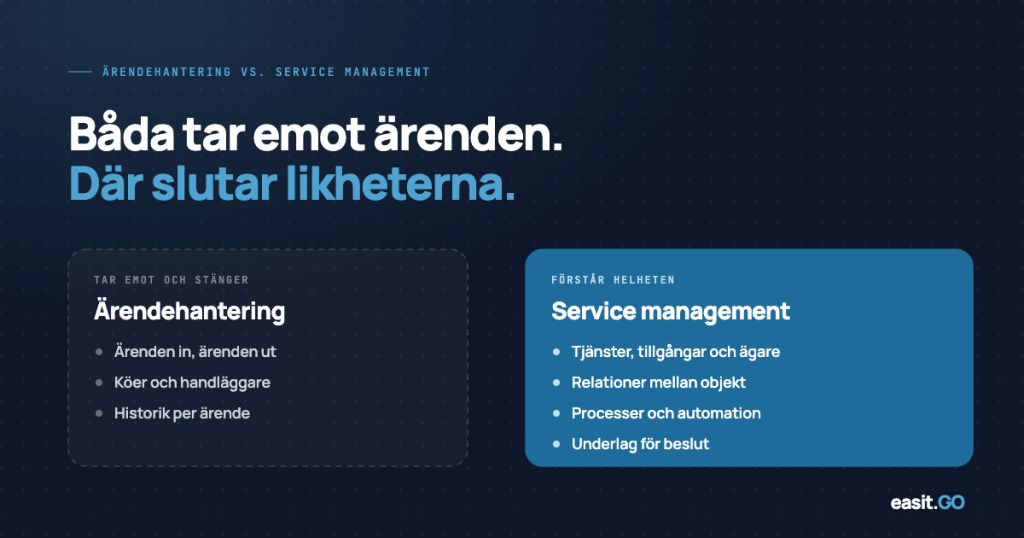
A service management platform is not a case management system with more features. It is a different way of organizing IT work, with case management as one of several parts.
The essence is that IT delivers defined services to defined recipients, with measurable levels and documented processes. This requires support for more than just an influx of cases:
- A CMDB that keeps track of assets and their relationships to each other and to services.
- Separate processes for incidents, problems, service requests and changes, with different flows and escalation paths.
- A service catalog and self-service portal where employees can order what they need without contacting IT directly.
- Change management with approval flows that ensure changes are planned and documented.
- Problem management that systematically seeks root causes of recurring incidents.
- SLA monitoring and reporting that shows how well IT is delivering against agreed levels.
- Knowledge management linked to the case flow, searchable for employees and end users.
This does not mean that everything has to be in place from day one. Different organizations have different conditions, maturity and needs. Most start with incident management and service requests, and build on it gradually, just as ITIL is intended to be applied in stages. The crucial thing is that the platform supports that journey, that it can grow with the organization without having to be replaced every time a new need arises.
Together, these elements make it possible to move from reactive to proactive IT. Not just solving problems when they arise, but preventing them, measuring them and continuously improving them.
Side by side
Concretely, the difference looks like this in everyday life:
Streamlined case management system | Service management platform |
Cases are received via email or form and assigned manually. | Cases are automatically classified and routed to the correct team based on type and priority. |
All cases are handled in one and the same flow.
| Incidents, service requests and changes are handled in separate processes with their own escalation rules. |
There is no connection between a case and the IT asset in question. | Each case can be linked to one or more CIs in the CMDB. The impact is immediately visible. |
Recurring problems are handled as new incidents each time. | Recurring incidents are linked to a problem case. The root cause is tracked and addressed. |
Employees contact IT to order services and permissions. | Employees order via the self-service portal. The approval flow is handled automatically. |
Changes are documented outside the system or not at all. | The RFC process is managed in the platform with approval, planning and follow-up. |
It is not possible to measure how long cases take, per category or team. | SLA reports and dashboards show delivery quality by service, team and period. |
When is a case management system enough?
The honest answer is that a pure case management system can last a long time. For an organization with few IT staff, limited system complexity, and low case volume, it is often a fully adequate tool. The overhead of processes and configuration is not always worth it.
But there are a couple of situations where the limit is clearly reached:
- The organization is growing and the case volume is increasing faster than the IT team.
- The same type of incidents recur without the root cause being found and addressed.
- Employees don't know where to turn, which creates parallel channels and dissatisfaction.
- IT cannot answer how they deliver, because there is no data to report.
- Legal requirements, internal audits or security requirements place demands on documented processes and traceability.
The last point is particularly relevant for municipal IT. The principle of openness, the Cybersecurity Act and internal governance requirements require that processes are documented and traceable. A case management system often does not provide that structure.
A common signal
When the IT manager cannot answer which five services are causing the most strain on the team, or how long the average incident takes to resolve, the tool has become a barrier to improvement rather than a support for it.
Changing is not starting over
A common concern when transitioning is that everything needs to be rebuilt from the ground up. That's rarely true. A well-executed implementation of a service management platform starts where the organization actually is, not where the framework says it should be.
In practice, this means that incident management and service requests are often migrated first, as this is where the case volume is and the value is seen the fastest. CMDB, problem management and change management are built on gradually, as the organization is ready.
It takes time to mature in ITSM work. But it requires the right tools to be able to do it at all.
Easit GO: platform, not system
Easit GO is a service management platform built to support the entire ITSM work, from incident management and service catalog to CMDB, change management and knowledge management. The platform is configurable without programming skills and is designed to grow with the organization. For the IT department, the processes are collected in an ITSM system that can be built on.
It's not a case management system with more buttons. It's a different way of working with IT delivery, supporting the processes that make it possible to move from putting out fires to delivering service systematically.
The difference between a case management system and a service management platform is not primarily technical. It's a question of what the IT department is set to do.
If the answer is “receive and close cases,” a simpler system is often sufficient. If the answer is “deliver services to the business in a structured, measurable, and proactive manner,” the tool needs to support that. And that’s something a pure case management system, no matter how many add-ons it gets, is not built for.
Read more
ITSM system for the IT department.
How Easit GO supports incident, problem, change and CMDB.
Book a demo
See Easit GO with your own case types.
Platform Features
Full overview of what Easit GO includes, including ready-made ITSM processes (Request, Incident, Problem, Change, CMDB), automation, reporting and integrations. A good starting point if you are evaluating the platform.
Relationship models in Easit GO
The article mentions the CMDB and the connection between cases and assets. Here we delve into how relationship models work in Easit GO: how you build the structure of your IT environment and see dependencies directly in the case flow.
Why Swedish municipalities choose a Swedish IT service management system
If your organization is a municipality or operates in the public sector: this article reviews what municipal IT specifically needs from its ITSM platform, including ITIL processes, data location, and governance requirements.

Henrik Traveler
Commercial Product Manager
henrik.resare@easit.com
+46 70 249 36 06